

Photo Up System
Every walk-in — captured, assigned, closed out.
Other systems hand you a number and ask you to trust it. The photo up system gives you a real-time photo, a salesperson, and an outcome for every customer who walks through the door.
Trusted by 2000+ Businesses





Seeing Is Believing: The Proof Is in the Photo
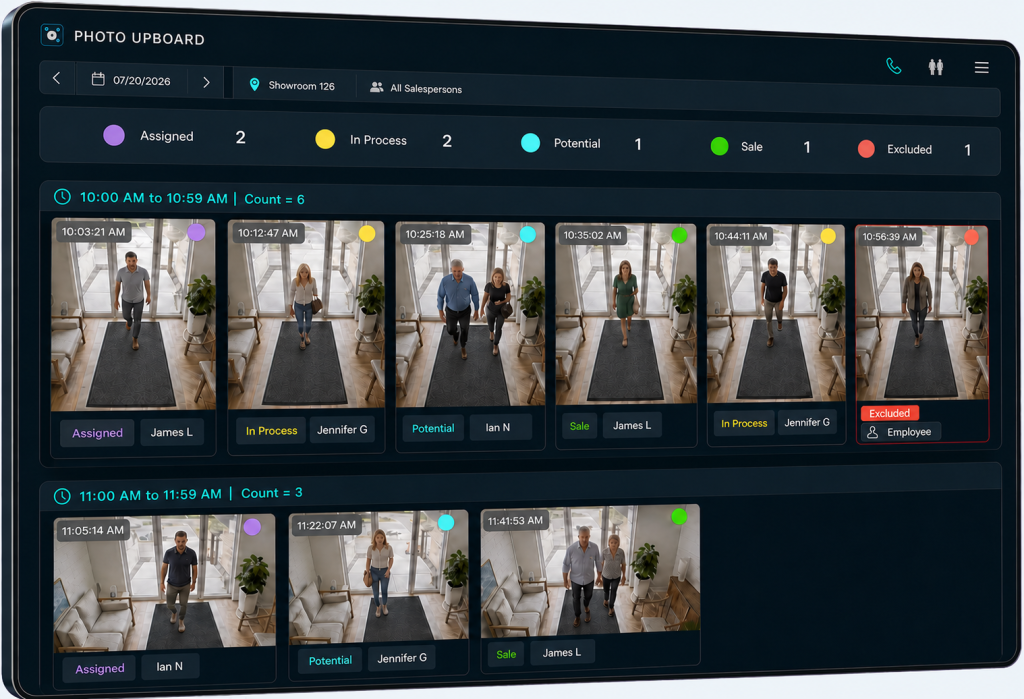
The Photo Up System feature digitizes your floor’s “ups” rotation. Every customer who walks in is captured and auto-assigned to the next salesperson in line — with a timestamped photo as the record of exactly who was up, and when.
No more disputes over whose turn it was. No more veteran reps cherry-picking customers or passing tire-kickers to rookies. Just a fair, visible rotation everyone can trust.
- Know exactly who was up for every customer who walked in — no sign-in sheet or honor system required.
- See the full rotation in real time, so every salesperson gets a fair, verifiable turn.
- Automatically exclude employees, delivery people, and duplicate entries, so the rotation only counts real opportunities.
How it Works
From walk-in to won — in four steps
Customer walks in
The moment someone steps through the door, Photo Upboard captures a timestamped photo — every visit on the record, none running on memory.
Auto-assigned to a salesperson
The customer is automatically routed to an available salesperson - No one on the floor goes unaccounted for.
Outcome logged
One tap marks it Sale, No Sale, or Potential — so you finally know what happened to every up, not just the ones that bought.
Follow-up queued
Next steps and reminders sync straight to your CRM, so no potential customer is ever forgotten.
Without Photo Upboard vs. with Photo Upboard
| Without Photo Upboard | With Photo Upboard | |
|---|---|---|
| Verification | A number you have to take on faith | A photo you can check, any time |
| Customer engagement | Untracked, based on memory | Every customer photographed & assigned |
| Accountability | No record of who helped whom | Salesperson tied to every interaction |
| Follow-up on "maybe later" | Left to individual memory — often lost | Automatically queued with notes & next steps |
| CRM data | Manual, inconsistent, incomplete | Synced automatically after every interaction |
| Cross-location visibility | Store-by-store, disconnected | Single view across your entire portfolio |
Designed for the Unique Challenges of High-Ticket Sales
Every up is worth real money
In high-ticket retail one missed customer isn't a rounding error; it's a $1K+ sale. Photo Upboard makes sure every arrival is caught and worked.
Sales rarely closes on visit one
Shoppers browse, leave, and come back. Logged outcomes and queued follow-up mean the "let me think about it" crowd doesn't fall through the cracks.
Conversion is your real lever
When traffic is low and tickets are high, a few points of conversion is everything. Tying every interaction to a rep and outcome shows you exactly where deals are won and lost.
TRUST SCORE
Our results speak for themselves
Last year alone, team members successfully counted over 3 million opportunities, with more than 2000 professionals trusting the Trakwell people counter to assist their sales teams in becoming more productive and converting foot traffic into paying customers.
Frequently Asked Questions
The Trakwell People Counter can be set up and tracking customers the day it arrives at your location.
A people counting system typically includes a dashboard for analyzing and reporting foot traffic and key performance metrics. This system uses a device specifically designed to accurately track and record the number of individuals passing through a particular doorway or entrance. Trakwell is a people counting software and device.
Yes. If for some reason a person is missed by the camera, you can manually add a person on the app.
Yes. You will have the same accuracy no matter how many doors you have. Multiple doors will use multiple cameras to get the most accurate counts.
Camera tracking, Thermal imaging, Proximity tracking technology, and AI Computer Vision are all different types of people counting technology.
The Benefits and Accuracy of Excluding Staff in People Counting
When it comes to optimizing your business operations, ensuring that the data collected is as accurate as possible is paramount. One crucial aspect of this is the exclusion of staff members from people-counting systems. Here’s why this is beneficial and how precise these systems can be.
Benefits of Excluding Staff
Enhanced Data Accuracy: By filtering out staff from the data, you ensure that the foot traffic analytics truly reflect customer presence. This leads to better insights for improving store layouts or managing resources.
Optimized Staffing: Understanding peak customer times without staff interference helps in planning staff schedules effectively, enhancing customer service while minimizing labor costs.
Improved Marketing Strategies: Without the skew of staff numbers in your analytics, marketing campaigns can be more accurately measured, allowing for targeted promotions and better ROI.
Effective Space Utilization: Accurate customer counts aid in identifying high traffic areas, enabling more strategic placement of products and promotions.
Accuracy of Staff Exclusion
Current people-counting technologies can achieve staff exclusion accuracies of up to 90%. This high level of precision ensures that the data you depend on for critical business decisions is reliable. Advanced algorithms and innovative technologies work in tandem to distinguish between staff and actual customers, providing you with a clear and accurate picture of customer behavior.
Incorporating such precise systems into your business infrastructure not only optimizes operations but also provides a competitive edge through data-driven decision-making.
Why Staying Informed in the Visitor Analytics Industry is Crucial
In the fast-paced world of visitor analytics, staying informed is key to maintaining a competitive edge. As technology and consumer behavior evolve, businesses must adapt quickly to harness new opportunities.
Keeping Pace with Technological Advancements
With innovations from companies like Google Analytics and Adobe Analytics, the tools and techniques for tracking visitor data continuously improve. Staying updated allows businesses to leverage the latest features, ensuring they gather precise, actionable insights.
Understanding Market Trends
The visitor analytics industry isn’t static. New trends, such as privacy regulations and AI integration, can significantly impact data collection methods and analysis. Being aware of these developments helps businesses adjust their strategies to remain compliant and effective.
Enhancing Customer Experience
Informed businesses can better tailor their strategies to match customer needs. By understanding the latest in visitor behavior analytics, companies can create more personalized and engaging customer journeys. This, in turn, boosts satisfaction and loyalty.
Driving Business Growth
Ultimately, staying informed allows businesses to make smarter decisions. By comprehensively understanding visitor data, companies can refine marketing efforts, optimize their operations, and increase their ROI.
Consistent learning and adaptation in visitor analytics ensure businesses not only meet but anticipate the demands of their market.
Understanding Privacy and GDPR Compliance Features
When considering the privacy aspects of a people counting sensor, it’s essential to examine two main features: GDPR compliance and data privacy measures.
GDPR Compliance: These sensors are designed to align with the General Data Protection Regulation (GDPR) standards, a crucial legal framework that governs data protection and privacy across the European Union. Compliance means that the sensor operates within strict guidelines to ensure that user data is handled responsibly and legally.
Anonymous Data Collection: To enhance privacy, these sensors collect data anonymously. This means they monitor foot traffic without capturing faces or any identifiable personal information, ensuring complete anonymity for individuals passing by.
By prioritizing these measures, businesses can both respect customer privacy and gather useful insights for improving services and operations.
Trakwell At a Glance
Every Solution You Need to Improve Your Teams and Automate Your Sales
Automate your traffic counts and don’t miss a beat with computer vision.
- Count buying groups.
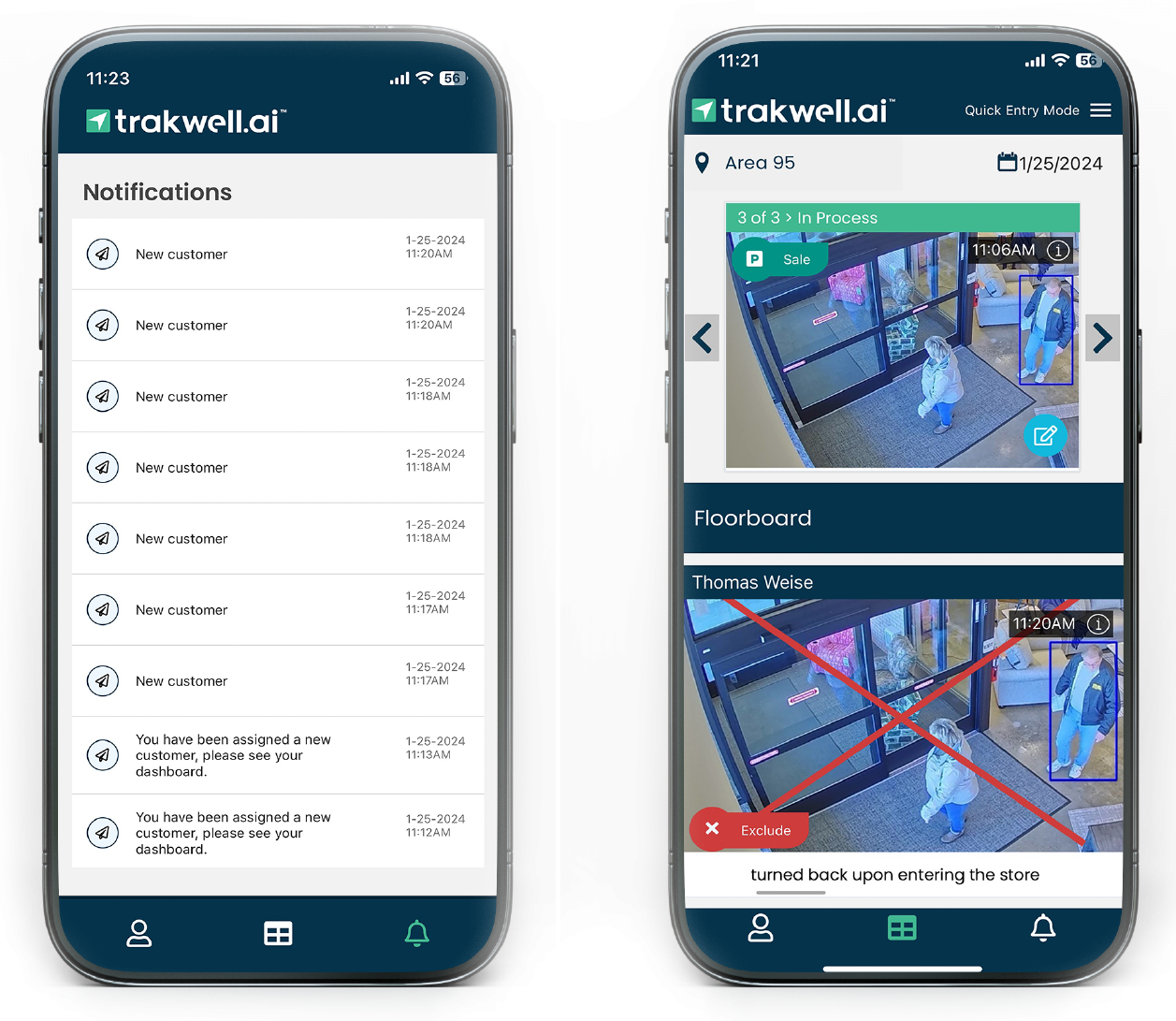
- Exclude counts. Eliminate photos that are not valid opportunities such as employee, delivery person duplicates.
- Capture all your store entrances. If a store has more than one entry, photos will be merged with time.
- Camera Alerts. Automatic alerts and instructions to get your camera back up and running.
Keep track of previous customers all in one place.
- Filter for prospects who contain certain criteria.
- View each customer’s history. All activity about each customer and prospective customer is displayed in an easy to follow timeline.
- Add activities, attachments, drawings, and notes to your customer record. Attach any documents or photos about the sales activities related to the customer.
- Action Calendar.
- Scheduled Action status tracking within Action Calendar.
- Start sending emails and email campaigns from Trakwell to tie sales communications with your customers.
- Set up email templates. Define standard templates for sending follow up emails, scheduled activities, and sales events.
- Send email campaigns to filtered prospects. Then send them your campaign template.
Stay on top of your scheduled follow up activities and events.
- Schedule follow up activities. Add appointments and items for prospective clients.
- Gather custom insights about your customers’ visit. Immediately get the picture of what is happening with all customers, salespeople, and stores.
- Capture sales and customer contact info. Sale amount, ticket name, address, will be captured. An automatic interface from some POS systems.
A user-friendly interface that makes it easy to manage staff and customers on the sales floor.
- Customize your up board rotation logic. Automatically track and assign customers to salespeople.
- Real-Time stats of every salesperson’s activity such as opportunities, sales, no sales, conversion rate. Etc.
- Handle high traffic volume. Turn on the open floor toggle so sales staff can manually assign themselves to photos.
Click on assigned customer images to add details about every in-store interaction with clients.
- Update customer photos with results. The salesperson will designate the result of each opportunity.
- Capture sales and customer contact information. Sale amount, ticket name, address, will be captured. An automatic interface from some POS system
Understand where you’re losing sales and identify opportunities for improvement.
- Easily track your sales performance.
- Sales Conversion and Sales vs. Opportunities
- Total Sales and Average Sales
- Revenue per opportunity
- Gather more information about sales staff workload and habits.
- Time spent with customers
- Reason reports (no sale/skipped ups/excludes)
- Sales Stats
- Insights about your customer’s shopping trends.
- Advertising source
- Repeat customers
- Product categories
Figure out how efficient your store is operating and analyze ways to improve it.
- Help determine store hours and staffing needs. Traffic charts will show your optimal traffic times and non-optimal times.
- Learn how your marketing efforts impact store traffic. Keep track of which advertising method brought the customer to the store.
Import your existing data to Trakwell, or export it into another software.
- Prior customer data can be added and Trakwell data can be exported
- Set store and company wide sales goals
- Track sales conversions per employee
- Send out score cards that encourage and inspire your team